If you run HDD work long enough, you learn a simple rule: production depends on what the locator crew can trust. You can have a solid rig, good tooling, and an experienced driller, but if the locate data gets confusing, the job slows down fast.
Digitrak F5 earned a long life in the field because it hits a practical balance. It gives the crew the core information needed to steer, verify depth, and react to signal problems without turning every locate into a science project. The system is not magic. Ground conditions, congestion, and operator habits still matter. But when you use it the right way, it stays predictable.
This guide breaks down what the unit tells you and what that means at the jobsite. You will also learn how to choose a transmitter that matches your work and how to buy refurbished equipment without taking on unnecessary risk.
What Is the DigiTrak F5 System and What Does It Do on a Jobsite?
A walkover locating system does one job: it helps you track the drill head and steer the bore using a transmitter in the housing and a receiver on the surface. Digitrak F5 is a common setup in that category, and it is still widely used because it provides the locate essentials in a format crews can work with every day.
On a typical job, the transmitter rides behind the bit and sends a signal through the ground. The receiver picks that up and displays locate information the operator can act on. When the locate tech and driller stay in sync, you reduce surprises. You also reduce rework, which is where HDD profits disappear.
Most crews care about three outcomes: keep the bore on line, maintain cover, and avoid damage. The value of a system like this is not just data on a screen. It is decision speed. The crew needs to know whether a change in numbers is a real steering issue, a signal issue, or a technique issue.
The next sections separate the components and show what each part contributes, so you can diagnose issues faster and buy the right setup the first time.
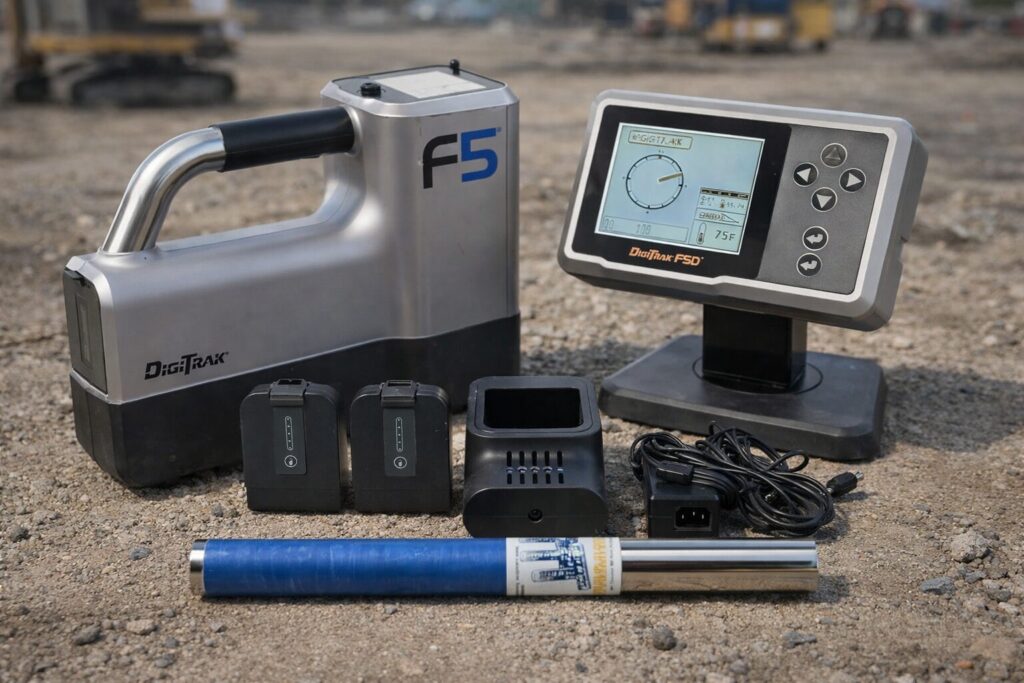
The Core Components: Receiver, Transmitter, Remote Display
The receiver is the handheld unit the locate tech walks with. It is the eyes of the operation above ground. Digitrak F5 receivers are built around giving you usable locate information quickly, not burying you in menus.
The transmitter is the sonde in the drill head assembly. It is the part that actually creates the signal and reports key drilling orientation information. When people say they lost signal, most of the time they are dealing with transmitter limitations, interference, or a setup mismatch.
The remote display is the bridge between the locate tech and the drill rig. Instead of yelling numbers across a right of way or relying on hand signals, the driller can see what matters on the rig in real time. That reduces delays on steering calls and keeps the rhythm of the bore steady.
In the field, the most important concept is compatibility. A receiver without the right transmitter is a dead end, and a transmitter choice that does not match your work leads to wasted time. Treat the system as a package, even if you buy components separately.
Who Typically Uses the DigiTrak F5: Operators, Foremen, Owners
The locate tech uses the receiver to call line and depth. The driller uses that information to steer and maintain the planned profile. Digitrak F5 fits that workflow because it is designed around steady, repeatable locating rather than constant tinkering.
Foremen and superintendents care about risk. If a crew has trouble holding signal, the job runs long, restoration costs rise, and you face more exposure around existing utilities. A system that keeps the team moving makes the schedule easier to control.
Owners and fleet managers look at cost per foot and downtime. A locator that sits on the shelf because it is confusing or unreliable is not an asset. A locator that stays in rotation is. The practical value shows up in fewer stoppages and fewer missed locate calls.
If you decide to invest, think about how your work is distributed. City work, long rural shots, and utility dense corridors do not stress equipment the same way. Matching the system to your typical job mix is the difference between a smart purchase and an expensive lesson.
Key Features of the DigiTrak F5 in Plain English
Most locating specs can be translated into one question: what can I do with this information right now. Digitrak F5 becomes easier when you view every feature through that lens.
A good crew watches a short list of indicators, confirms them with repeatable technique, and makes small corrections early. That is how you stay on line without oversteering. You are not trying to win a contest with perfect numbers. You are trying to finish the shot without surprises.
Here is the plain English breakdown of what matters most, plus the hard numbers that actually affect purchasing decisions. These figures are based on Digital Control Incorporated transmitter specifications and support documentation.
- Depth range for common 15 inch transmitters is 65 ft, 19.8 m.
- Battery type and runtime options are listed as 2 C cell alkaline at 20 hours awake and 200 hours asleep, or 1 SuperCell at 40 hours awake and 300 hours asleep.
- Maximum transmitter temperature is listed as 220 F, 104 C.
- Typical transmitter size is 15 in by 1.25 in, 38.1 cm by 3.175 cm.
- Fluid pressure models monitor downhole drilling fluid pressure up to 250 psi, 1725 kPa.
Those numbers are only useful if you know what they change on a job.
- Depth range 65 ft 19.8 m is your planning boundary for a typical walkover pass. If your bore routinely runs close to that number, you should expect less signal margin. That means more time confirming the locate point, more sensitivity to site conditions, and less tolerance for sloppy technique. It also affects your staffing plan, because deep work usually requires tighter coordination between the locate tech and the rig.
- Battery life numbers tell you whether your transmitter choice fits your workday. Digital Control documentation lists 2 C cell alkaline around 20 hours awake and 200 hours asleep, while a SuperCell is listed around 40 hours awake and 300 hours asleep for common configurations. If you run long days, multiple shots, or you want fewer battery related surprises, those hour ratings matter because they reduce unplanned stops mid shot.
- Maximum temperature 220 F 104 C is not a nice to have. It is a hard line. High friction drilling, long pulls, or poor fluid management can push temperatures up. If you treat temperature as an early warning, you prevent intermittent readings and reduce the chance of transmitter damage.
- Physical size 15 x 1.25 in affects compatibility with housings and tooling adapters. If you swap transmitters between crews, confirm the housing fit and adapter requirements before you arrive on site. A mismatch here turns into downtime.
- Fluid pressure up to 250 psi 1725 kPa matters only if you use it as a trend tool. Pressure is useful because trends can help you react before the bore gets expensive.
Bottom line: these specs shape how much margin you have in the field. The closer you operate to the limits, the more disciplined your locating process needs to be.
Real Time Locate Data You Actually Use with DigiTrak F5
The receiver shows the locate tech where the transmitter is and how it is oriented. Digitrak F5 is popular because it presents that information in a way most crews can act on without constant second guessing.
Depth is the most obvious number. It tells you cover at the transmitter location, which helps you avoid shallow crossings and maintain clearance. Pitch tells you the drill head angle. It is the steering trend that keeps you from drifting into a low spot or popping up early. Roll tells you the rotational orientation, which matters when you are using steering tools that depend on clock position.
Signal strength is your confidence meter. If it drops or fluctuates, you should assume a weak signal path or site conditions until proven otherwise. Temperature helps protect the transmitter, and Digital Control documentation lists a maximum temperature of 220 F. Overheating can cause unstable behavior and shortened life in the real world.
A practical habit is to call depth and pitch consistently and treat sudden changes as a reason to confirm, not panic. Use repeat passes and a stable stance before you accept a number. A clean technique often fixes bad readings that are really operator induced.
Digitrak F5 Remote Display on the Rig and Why It Speeds Up Work
On many crews, the biggest waste is communication friction. The locate tech has the information, but the driller needs it now. A remote display shortens that loop by putting key locate data where the driller can see it.
When the driller can see the numbers at the rig, the team spends less time repeating calls and less time waiting for confirmation. Small steering moves happen sooner, which prevents bigger corrections later. That translates into smoother bores and fewer stop and check cycles.
Remote display also improves training. New drillers learn faster when they see pitch and other indicators as part of the steering conversation, not as random numbers shouted across the site. That keeps the operation consistent across crews and across foremen.
If you run work where you cannot keep constant line of sight between locator and rig, the remote display becomes more than a convenience. It is a production tool that reduces delays and preventable mistakes.
Digitrak F5 Fluid Pressure Monitoring and When It Helps
Some transmitter models include fluid pressure monitoring. Digital Control documentation for F5 fluid pressure transmitters lists downhole drilling fluid pressure monitoring up to 250 psi, with measurement through sensor ports on the front end cap on either side of the index slot.
Pressure data helps most when you use it for trends. A rising trend can support a decision to adjust fluid strategy, rotation habits, or reaming approach before the bore turns into a stuck pipe situation. It is not about chasing a perfect number. It is about noticing that the bore is changing while you still have room to respond.
Pressure capability should not be your first filter unless your work routinely pushes limits. If you run long shots, deep crossings, or mixed ground that can pack off, pressure monitoring can add useful context. If your work is mostly short services, you will usually get more value from disciplined locate technique and keeping batteries and charging habits tight.
Treat pressure as an extra tool, not as a replacement for good locating fundamentals.
What Makes the DigiTrak F5 Practical in the Field: Ease of Use and Learning Curve
Most crews do not fail because they lack features. They fail because they cannot apply the features under pressure. Digitrak F5 remains practical because it supports a repeatable routine that crews can train and execute.
A reliable locating routine has two goals. First, it reduces interpretation errors. Second, it keeps the pace steady so the driller does not start making decisions without confirmed information. When the routine is consistent, you spot true problems faster because the noise drops.
Ease of use is not about being simple. It is about being consistent. The crew should know what a normal reading looks like, what a suspect reading looks like, and what steps to take before calling for a stop.
In this section, the focus is not on theory. It is on the habits that keep jobs moving and keep the crew from blaming equipment for avoidable technique mistakes.
A Simple Walkover Workflow for Digitrak F5: Find, Confirm, Track
A clean workflow turns locate data into steering decisions. Digitrak F5 supports this approach well when the operator stays disciplined.
- Find the transmitter signal and settle into a stable stance.
- Confirm the locate point with a repeatable sweep pattern.
- Verify depth and pitch, then make the call to the rig.
- Move forward and repeat at a consistent interval.
- If readings shift suddenly, do a second confirmation pass before calling a major correction.
- If confidence drops, stop and troubleshoot the signal rather than forcing the bore.
This routine sounds basic, but it eliminates most bad calls. It also makes training easier because every locate tech follows the same steps. You can coach technique instead of debating what the screen might mean.
A practical tip is to keep your calls consistent. If you change how you call numbers on different jobs, you increase confusion at the rig. The system can only help if the team uses it with a shared standard.
Common Operator Mistakes with Digitrak F5 and How to Avoid Them
When crews struggle, they often blame the locator. In reality, a few habits create most problems. Digitrak F5 works best when you remove those avoidable errors.
One common mistake is accepting the first reading without confirming it. A second pass takes seconds and can save hours. Another is overreacting to small changes. Minor fluctuations happen. Your job is to confirm trends, not chase noise.
Poor positioning also causes trouble. If you are standing at an odd angle or moving too fast, you create inconsistent sweeps. Slow down and keep your stance repeatable. If the jobsite is tight, take the extra moment to get your body position right.
Finally, crews often ignore signal strength until they lose signal completely. Treat signal strength like a warning light. If it degrades, adjust early. That may mean changing your locate position, confirming the environment, or switching transmitter options when the job calls for it.
Good habits make the equipment look better because they remove self inflicted problems.
Choosing the Right Transmitter for the Digitrak F5 for Your Jobs
A receiver is only half the story. The transmitter is what determines whether you can hold signal in your real conditions. Digitrak F5 buyers should treat transmitter selection as the main decision, then build the rest of the package around it.
Here is a practical way to pick a transmitter based on the numbers that actually affect production.
- Start with your typical depth and your worst case depth. Common 15 inch transmitter specifications list a 65 ft 19.8 m depth range. If your normal work is well under that, you have margin and you can prioritize convenience and site fit. If your work frequently pushes near that number, choose the option that gives you the cleanest, most repeatable signal on your sites and plan for slower confirmation passes. Deep work eats margin fast.
- Pick runtime that matches how you schedule crews. If you regularly run long days or you cannot afford a battery related interruption, lean toward the battery setup with the longer listed awake hours. Digital Control documentation lists a SuperCell around 40 hours awake and 300 hours asleep for many transmitter configurations, compared with 2 C cell alkaline around 20 hours awake and 200 hours asleep. The difference becomes real when you are mid shot and the crew is committed.
- Decide whether pressure data is worth paying for. If you do long shots, deep crossings, or you routinely fight pack off risk, a fluid pressure transmitter that monitors up to 250 psi 1725 kPa can add context that helps you change behavior early. If your work is mostly short services, you will often get more return from disciplined locating and good battery habits than from pressure capability.
- Plan around temperature instead of hoping. The published maximum temperature is 220 F 104 C. If your work tends to run hot, treat temperature as an operational control point. Better fluid management and avoiding unnecessary friction protect the transmitter and stabilize readings.
If you apply those steps, the choice stops being guesswork. You are matching your transmitter to depth demands, runtime expectations, and how hard you push tooling, which is what keeps the crew moving.
Start by listing your typical work. Consider average depth, the amount of congestion, and whether you commonly work near energized corridors. Then decide what you need most: predictable performance for a narrow set of conditions or flexibility across mixed work.
You also need to plan for failure modes. A transmitter can get damaged, overheat, or behave poorly in specific soils. A backup option is not a luxury if you run tight schedules. It is a way to keep the crew working while you repair or replace equipment.
The goal is not to own every transmitter on the market. The goal is to own the right one and have a second option that covers your most common problem job. That approach usually costs less than the downtime caused by a single mismatch.
Common Digitrak F5 Transmitter Options and Why the Specs Matter
Transmitters get described by length, battery type, temperature limits, and whether pressure monitoring is included. The point is not to memorize numbers. The point is to understand what changes your job.
If you are consistently under typical depth limits, you can move faster because you have signal margin. If you operate near the limit, you slow down and confirm more often. That is not weakness. That is professional control.
If you run long days, runtime dictates whether you end up swapping batteries when the crew is committed. If you have ever had a mid shot interruption, you already know the cost is not the battery. The cost is the schedule disruption and the stress it puts on the crew.
If you drill hot, temperature limits matter. High friction situations often arrive without warning. Monitoring temperature and keeping drilling practices clean protects the transmitter and reduces unstable locate behavior.
Finally, pressure monitoring is useful when you treat it as a trend indicator. It can add context that helps you adjust before the bore becomes expensive.
Digitrak F5 Compatibility Checklist Before You Buy
Compatibility mistakes are expensive because they waste time and create avoidable returns. Digitrak F5 purchases should follow a checklist before money changes hands.
Confirm these points in plain language with the seller:
- Receiver model and transmitter model match.
- Battery packs, charger, and power accessories are included or budgeted.
- The seller can describe what was tested and what was replaced.
If the seller cannot answer basic compatibility questions, take that as a warning. A trustworthy seller will help you match the setup to your work because they know the cost of mismatches is high for both sides.
When you do this right, you avoid the worst kind of downtime. That is the downtime you pay for after you thought you solved the problem.
Buying Used vs Refurbished Digitrak F5 Equipment and What You Are Really Paying For
There is a big difference between used and refurbished. Used can mean anything from pulled off a working rig to unknown history. Refurbished should mean the equipment was inspected, tested, and prepared to perform predictably. Digitrak F5 buyers should focus on predictability because HDD work punishes uncertainty.
Price matters, but downtime costs more. If you save money and lose a day on a jobsite, you did not save anything. You shifted the cost from the purchase to the schedule. That is why refurbished equipment with a clear warranty often makes better business sense than cheap, unverified gear.
Refurbished buying is also about support. When a transmitter fails, you need a clear path to resolution. You should not have to argue about whether the failure is normal wear. A simple warranty process keeps the crew moving and protects your reputation with customers.
In the next subsections, you will see what red flags to avoid and what tested should mean in practical terms.
Red Flags When Shopping for Used Digitrak F5 Locating Gear
A low price can hide a high risk purchase. Digitrak F5 gear is durable, but it is not immune to abuse, water exposure, overheating, or poor storage.
Watch for listings that do not specify what is included. A complete setup should not be missing chargers, battery packs, or the remote display if the listing implies it is part of the package. Also watch for sellers who cannot answer basic questions about compatibility or whether the unit holds stable readings.
Another red flag is vague testing language. Powers on is not a test. A locator that turns on can still be unreliable in the field. You want equipment that was inspected and evaluated in a way that matches real use.
Finally, be cautious when the seller avoids warranty discussion. If the answer is all sales final, you are the quality control department. If you do not have bench testing and backup gear, you are gambling with production time.
What Fully Tested Should Mean for Digitrak F5 in Practice
Testing should match how you work. Digitrak F5 equipment should be evaluated for stable signal behavior, consistent locate readings, and reliable communication between components.
At minimum, tested should mean the receiver tracks a transmitter consistently, screen functions operate correctly, and the system does not show erratic behavior under normal conditions. It should also mean the seller confirmed key accessories function, especially chargers and battery packs, because battery problems create fake locator problems in the field.
A good seller can also tell you what they did not do. That honesty matters because it prevents misunderstandings. If a part is sold as used and not rebuilt, they should say so. If a unit was refurbished and carries a warranty, the terms should be clear.
When you buy with those standards, you get more than a device. You get confidence that it will perform when the schedule is tight and the customer is watching.
Where to Buy Refurbished Digitrak F5 Equipment
If you want to reduce risk, buy from a seller who specializes in HDD gear and stands behind what they ship. Digitrak F5 is still widely used, which means you have options. The real question is whether those options protect your schedule.
At UCG HDD, the focus is straightforward: ship equipment that is described clearly, support buyers who need the right fit, and move product quickly when downtime matters. UCG HDD also highlights fast USA shipping and worldwide shipping availability.
If you are shopping for a used unit for sale and you want a clear price and availability, start with the Digitrak F5 collection page.
In the subsections below, you will see the purchase process step by step, what to prepare before you order, what happens after you place the order, and how warranty and shipping policies support production planning.
Step by Step: How to Buy from the Digitrak F5 Collection Page
Here is a clean buying process that avoids compatibility mistakes and shortens lead time. Digitrak F5 purchases go smoother when you treat the order like a job plan, not an impulse buy.
- Review the collection page and decide whether you need a locator, a transmitter, or a complete locating package.
- Identify the configuration that fits your work. Focus on job conditions, not just one spec number.
- Confirm what is included in the listing. A complete system is described as a handheld receiver, a transmitter, a remote display, a battery charger, and three rechargeable Li ion battery packs.
- If you have any doubt about compatibility, call before ordering. The collection page lists a phone number for quick help.
- Choose shipping based on your schedule. If you need equipment urgently, request next day delivery within the USA where available.
- When the equipment arrives, do a quick check on day one. Confirm charging, power up, and basic operation before the crew is committed to a shot.
What to prepare before you buy is simple: know your typical depths and whether your workflow relies on a remote display. If you can describe your job mix, it is easier to match the right setup.
Warranty and Replacement Confidence for Digitrak F5 Transmitters
Warranty matters because it turns equipment problems into a process instead of a crisis. UCG HDD’s transmitter warranty policy states coverage begins on the delivery date and lasts 100 days for transmitters, excluding certain Falcon series terms.
If a warranty claim requires replacement, the policy states the replacement transmitter inherits the remaining warranty of the original transmitter or 30 days from the replacement date, whichever is greater.
That structure matters for planning. It tells you what happens next, how coverage is defined, and why buying refurbished does not have to feel like a gamble. It also reduces the temptation to keep drilling with questionable equipment because you fear losing the purchase.
The practical takeaway is simple: clear warranty terms protect your schedule.
Shipping, Timing, and Avoiding Downtime with Digitrak F5 Orders
Shipping is part of the cost of downtime. If the crew is waiting, every day is expensive. Digitrak F5 buyers should plan logistics the same way they plan tooling and fluid.
UCG HDD highlights next day delivery within the USA on listings and also states worldwide shipping availability. That matters when you have a start date you cannot move or when a transmitter failure would idle the crew.
A smart approach is to think in time windows. If the job starts next week, standard options may be fine. If you need coverage tomorrow, request next day delivery and build a backup plan. The cost of faster shipping is often lower than the cost of losing a day.
For international buyers, the key is predictability. Worldwide shipping options let you plan around lead times rather than hoping a local listing appears at the right moment.
Trade In Options to Reduce Your Digitrak F5 Upgrade Cost
Upgrading does not have to mean stacking old gear in a shop corner. Digitrak F5 owners can reduce the cost of moving to a better setup by trading in or selling equipment they no longer use.
UCG HDD states it accepts trade ins and promotes trade in deals, and it provides a sell or trade pathway. The benefit is straightforward. You turn idle equipment into budget for the gear that is actually earning money.
It also simplifies inventory because you stop maintaining equipment that does not match your current work. If you are considering an upgrade, gather a quick list of what you have, what condition it is in, and what you want to move toward. A short call can usually tell you whether a trade makes sense before you invest time in shipping.
A smart trade reduces cash outlay and shortens the path to dependable equipment.
Conclusion: A Simple Decision Path for Digitrak F5
The best locating setup is the one that keeps your crew confident and your bore moving. Digitrak F5 remains common because it delivers core locate and steering information in a way crews can apply quickly.
If you want to make a practical decision, follow a simple path. First, match the transmitter to your typical job conditions using real limits like 65 ft depth range for common 15 inch transmitters and runtime expectations tied to your schedule. Second, build a locating routine that confirms readings before you commit to steering changes. That habit saves more time than any shortcut.
Then buy in a way that protects your schedule. Clear warranty terms, fast shipping options, and a seller who can answer compatibility questions reduce risk more than chasing the lowest number online. When you treat the purchase like a production decision, you end up with equipment that earns money instead of costing time.